Troubleshooting and Diagnostics
Diagnostic Tool
The product requires correct parameter configuration to run properly. The diagnostic tool allows users to check the status of each service via a command-line window. The command-line tool is cross-platform and works on both Windows and Linux.
1. Usage
- A Diagnostic Tool option is added to the SimOne system tray menu. When the user clicks it, a command-line window opens.
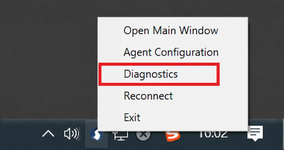
- The tool displays results in a command-line interface. After executing the command, the status of each module is printed to the screen at once.

2. Service Status Check
| Field | Description |
|---|---|
| Name | The name of the module being diagnosed. |
| Method | The method used to connect to the service, including communication protocol, IP address, port number, and check command. |
| Status | The detection result returned for the current service. |
| Result | If an exception is returned, this field provides additional information about the exception. |
3. Module Names
| Module | Responsibility |
|---|---|
| CybertronRedis | Stores user login-related information (user info, failed login attempt count). |
| CybertronDataService | Data service — stores scenario cases, directories, map data, and generates map collision bodies. |
| CybertronTaskServer | Web service — task management; also stores agent and work information. |
| CybertronUserServer | Web service — user permission management; currently also handles notifications. |
| CybertronAssetServer | Web service — manages assets including ego vehicles, controllers, sensors, and ego vehicle models. |
| CybertronXVIZServer | Simplified rendering backend data provider — receives heat map data from CybertronVisualizer and pushes XVIZ protocol data to simplified rendering clients. |
| CybertronAgent | Backend service — manages work nodes. |
| CybertronMaster | Backend service — manages agent nodes. |
| RoadNetworkRTService | Road network service — handles client requests for road network information at specified waypoints (whether within a lane, elevation), as well as world coordinate and ST coordinate conversions. |
4. Status Types
| Status | Description |
|---|---|
| 0 | The system returned normally. |
| Non-0 | A non-zero value indicates an error code. |
5. Result
{"code":-1,"data":
  {"authCode":"10000","masterIP":"127.0.0.1:4500","message":"ok","state":"AgentState_Ready","webIP":"127.0.0.1:30083"}
}