Third-Party Middleware: ROS
SimOne provides Robot Operating System (ROS) middleware support. Through the ROS API, SimOne connects the simulation platform to the ROS ecosystem, enabling publication of sensor data and subscription to vehicle control commands. Developers can receive GPS, ground-truth, radar, and other sensor data from simulation scenarios directly within a ROS environment, and send control commands via ROS Topics to drive the simulated Ego Vehicle. This is suitable for developing and validating autonomous driving algorithms based on ROS.
1. Data Interaction Overview
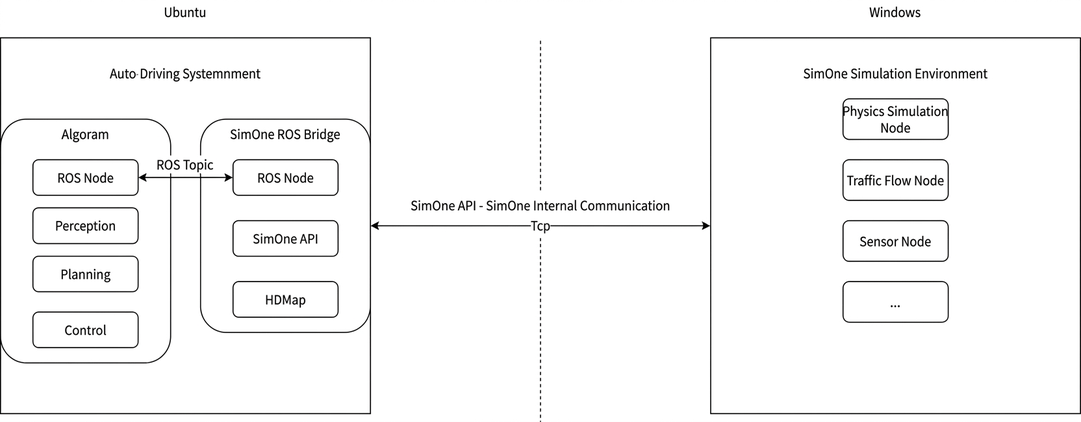
(1) Retrieve Simulation Perception Data: The ROS API collects perception data from the SimOne simulation platform.
(2) Data Conversion: The collected simulation perception data is converted to standard ROS message formats.
(3) Publish Messages to ROS Topics: The converted data is published to designated ROS Topics for further use.
(4) Driving Algorithm Subscription and Processing: The driving algorithm module subscribes to these Topics and passes the data into planning/control or perception modules for training and processing.
(5) Publish Control Messages: After algorithm processing, the resulting control messages are published to the Ego Vehicle control Topic.
(6) Closing the Control Loop: The ROS API captures these control messages and passes them as parameters to the dynamics Node of the simulated Ego Vehicle, driving its actions in the simulation scenario.
(7) Algorithm Validation and Debugging: The driving algorithm can subscribe to specific Topic messages to validate the accuracy of individual modules. In addition, by establishing a closed-loop system within the ROS environment, the overall performance of the driving algorithm can be comprehensively validated.
2. Data Communication Flow Diagram

3. Software Environment
- Programming Language: C++
4. Build Environment
4.1 ROS Message Conversion
Convert SimOne API data formats to standard ROS-publishable/subscribable data formats.
(1) Write ROS msg Message Files
Based on the SimOne API data, and following the mapping between C++ data types and ROS msg data types, write the corresponding ROS API msg message files.
(2) Create ROS Project Workspace
Run the following commands to create a ROS project workspace:
  mkdir -p ~/catkin_ws/src
  cd ~/catkin_ws/src
  catkin_init_workspace
(3) Create a Package
Run the following commands:
  cd ~/catkin_ws/src
  catkin_create_pkg <package_name> roscpp std_msgs
(4) Add msg Files to the Package
Place the msg files you wrote into the designated directory within the package:
mkdir ~/catkin_ws/src/<package_name>/msg
(5) Add Dependencies
Add the required dependencies in ~/catkin_ws/src/<package_name>/package.xml:
  <build_depend>message_generation</build_depend>
  <exec_depend>message_runtime</exec_depend>
(6) Modify CMakeLists.txt
Add the necessary build options to ~/catkin_ws/src/<package_name>/CMakeLists.txt to support compiling custom messages:
find_package(catkin REQUIRED COMPONENTS
    roscpp
    std_msgs
    message_generation
)

add_message_files(FILES
    <ROS API msg file .msg>
)

generate_messages(DEPENDENCIES
    std_msgs
)

catkin_package(
    CATKIN_DEPENDS roscpp std_msgs message_runtime
)
(7) Build the Package
Return to the catkin_ws directory and build the package:
  cd ~/catkin_ws
  catkin_make
(8) Check C++ Header Files
Verify that the C++ header files generated from the msg files are located in the following directory:
~/catkin_ws/devel/include/<package_name>/
(9) Integrate Generated C++ Header Files into the ROS API Project
Incorporate the C++ header files generated in step (8) into your ROS API project so that custom messages can be used.
4.2 ROS Interface Sample Project Directory Structure
ROS/
├── CMakeLists.txt       # Project build script
├── gen_make_debug.sh    # Debug build environment generation script
├── gen_make_release.sh  # Release build environment generation script
├── include              # Project header files
├── lib                  # Project dependency libraries
├── run                  # Output directory for ROS API node executables
└── src                  # ROS API project source files
4.3 ROS Interface Sample Project Build
To build the ROS interface project, follow these steps:
(1) Run the build script:
- For debug mode, run the
gen_make_debug.shscript. - For release mode, run the
gen_make_release.shscript.
(2) Enter the build directory:
- For a debug build, use
cd build_debugto enter the build directory. - For a release build, use
cd build_releaseto enter the build directory.
(3) Start the build:
- Run
makein the command line to start the build. Once complete, the ROS API node executable will be generated atrun/trans_node_ros.
5. Running the ROS Communication Node
To start and run the ROS API node, follow these steps:
(1) Start ROS Core:
- Run
roscorein the command line to start the ROS core service.
(2) Run the ROS API Node Executable:
-
Run the
trans_node_rosprogram. On startup, it reads initialization settings from theconfig.iniconfiguration file. -
config.ini Runtime Configuration File
[BridgeIO]  SimOne API client connection settings
BridgeIO_IP=10.66.9.111  SimOne BridgeIO node IP

[HostVehicle]  SimOne simulation Ego Vehicle settings
Vehicle_ID=0  SimOne simulation Ego Vehicle ID

[Sensor]  SimOne sensor communication configuration
IMG_IP=10.66.9.244       Image data UDP receiver IP
IMG_PORT=13944           Image data UDP receiver port
PCD_IP=10.66.9.244       Point cloud data UDP receiver IP
PCD_PORT=6699            Point cloud data UDP receiver port
PCD_PORT_INFO=7788       Point cloud data UDP info port

[ROS]  ROS message configuration
GPS_Topic=/gps                    GPS message publish Topic
GroundTruth_Topic=/ground_truth   Ground-truth object message publish Topic
Image_Topic=/image                Image data message publish Topic
PointCloud_Topic=/point_cloud     Point cloud data message publish Topic
Radar_Topic=/radar_detection      Millimeter-wave radar data message publish Topic
Sensor_Topic=/sensor_detection    Object and sensor ground-truth data message publish Topic
LaneInfo_Topic=/lane_info         Perception lane/lane line data message publish Topic
CTL_Topic=/control                Ego Vehicle control (throttle/brake/steering) message subscribe Topic
POSE_CTL_Topic=/pose_control      Ego Vehicle control (discrete points) message subscribe Topic
6. Message Verification
6.1 Run a SimOne Test Use Case
(1) SimOne Simulation Operations
- Start SimOne and create a new test Use Case.
- Create a new test Ego Vehicle (attach relevant sensors, set the control system to Manual / API control).
- Run the Use Case (select the Ego Vehicle).
(2) ROS-Side Operations
- Run SimOne ROS Bridge.
- Start the third-party algorithm.
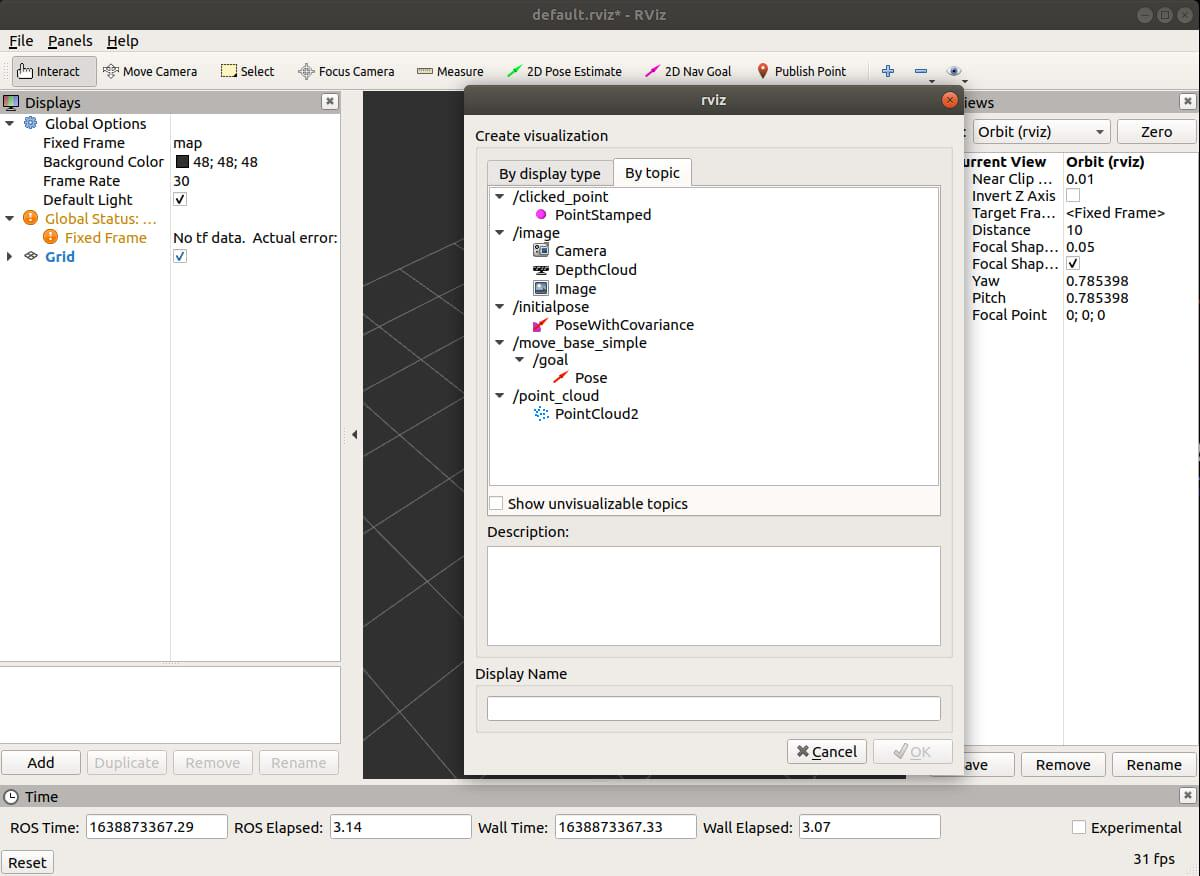
6.2 Image Data Verification
- Use the
rvizvisualization tool to subscribe to theImage Topicand display real-time image data.
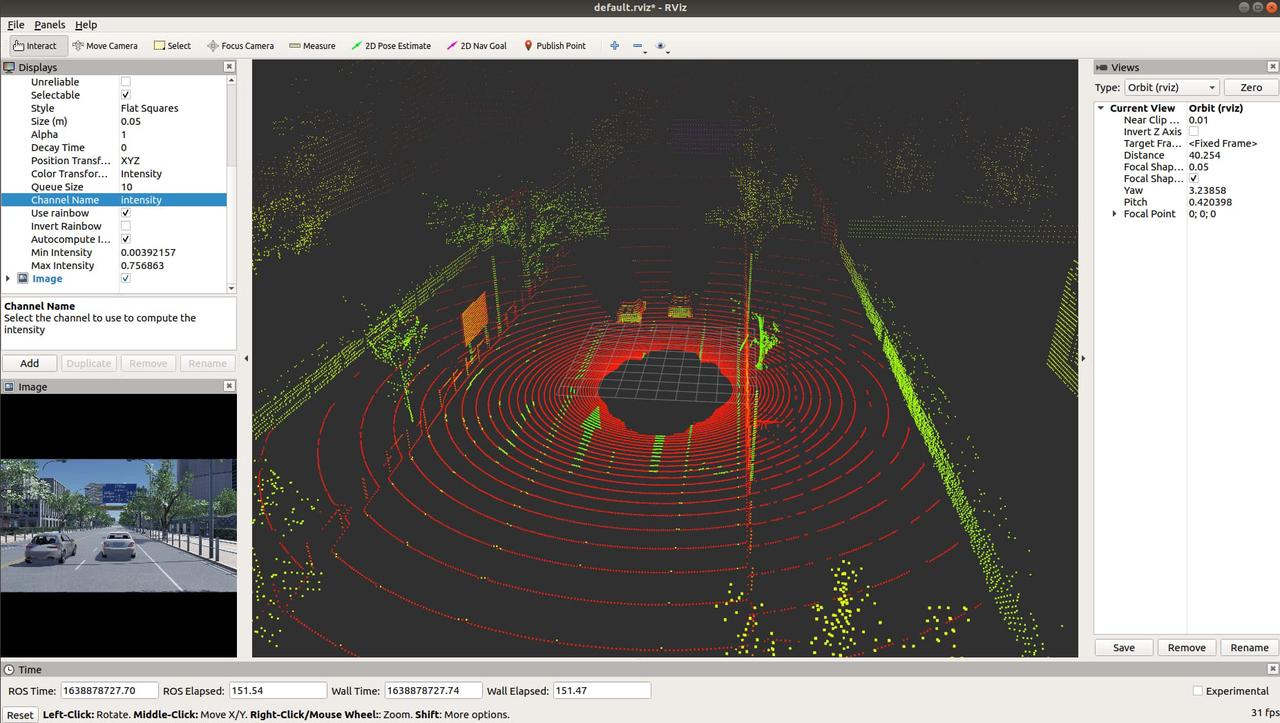
6.3 Point Cloud Data Verification
- Subscribe to the
PointCloud Topicviarvizand observe real-time point cloud updates.
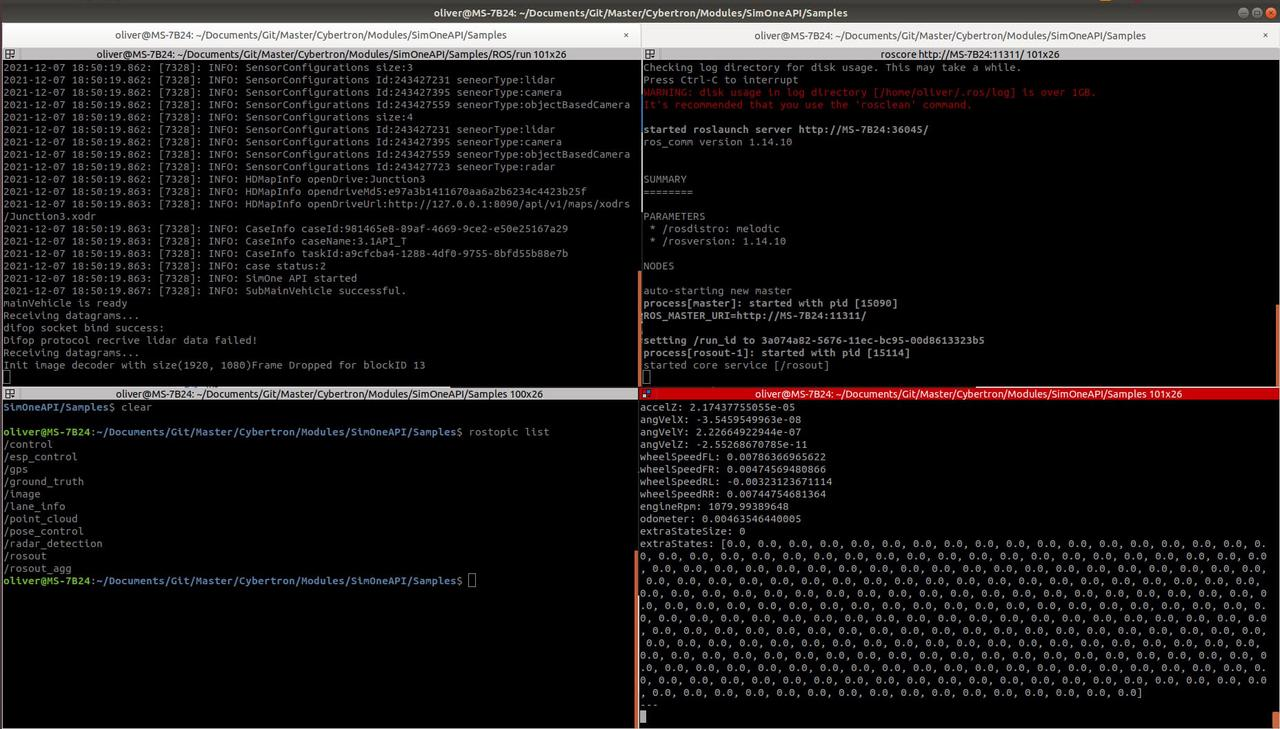
6.4 Structured Data Verification
- Run the following commands to configure the environment and listen to the ROS Topic for real-time output:
  source ~/catkin_ws/devel/setup.bash
  rostopic echo /gps
7. Interfaces
(1) Retrieve simulation perception data via the SimOne API
// Ego Vehicle GPS message callback
bool SetGpsUpdateCB(void(*cb)(const char* mainVehicleId, SimOne_Data_Gps *pGps));
// Ground-truth perception object callback
bool SetGroundTruthUpdateCB(void(*cb)(const char* mainVehicleId, SimOne_Data_Obstacle *pObstacle));
// Camera image data callback
bool SetStreamingImageUpdateCB(const char* ip, unsigned short port, void(*cb)(SimOne_Streaming_Image *pImage));
// LiDAR point cloud data callback
bool SetStreamingPointCloudUpdateCB(const char* ip, unsigned short port, unsigned short infoPort, void(*cb)(SimOne_Streaming_Point_Cloud *pPointCloud));
// Millimeter-wave radar target information callback
bool SetRadarDetectionsUpdateCB(void(*cb)(const char* mainVehicleId, const char* sensorId, SimOne_Data_RadarDetection *pDetections));
// Object and sensor ground-truth data callback
bool SetSensorDetectionsUpdateCB(void(*cb)(const char* mainVehicleId, const char* sensorId, SimOne_Data_SensorDetections *pGroundtruth));
// Perception lane and lane line data callback
bool GetSensorLaneInfo(const char* mainVehicleId, const char* sensorId, SimOne_Data_LaneInfo *pLaneInfo);
(2) Publish perception messages to the corresponding Topics via ROS Publisher
// Publish GPS message
pub_gps = handle_gps.advertise<msg_gen::gps>(gps_topic.c_str(), 1);
pub_gps_p->publish(gps_d);
// Publish ground-truth perception object message
pub_ground_truth = handle_ground_truth.advertise<msg_gen::obstacle>(ground_truth_topic.c_str(), 1);
pub_ground_truth_p->publish(obstacle_d);
// Publish camera image data message
pub_image = handle_image.advertise<sensor_msgs::Image>(image_topic.c_str(), 1);
pub_image_p->publish(img_d);
// Publish LiDAR point cloud data message
pub_point_cloud = handle_point_cloud.advertise<sensor_msgs::PointCloud2>(point_cloud_topic.c_str(), 1);
pub_point_cloud_p->publish(point_cloud_d);
// Publish millimeter-wave radar target information
pub_radar = handle_radar.advertise<msg_gen::radardetection>(radar_topic.c_str(), 1);
pub_radar_p->publish(radar_detection_d);
// Publish object and sensor ground-truth message
pub_sensor = handle_sensor.advertise<msg_gen::sensordetections>(sensor_topic.c_str(), 1);
pub_sensor_p->publish(sensor_detections_d);
// Publish perception lane/lane line message
pub_laneinfo = handle_laneinfo.advertise<msg_gen::laneinfo>(lane_info_topic.c_str(), 1);
pub_laneinfo_p->publish(lane_info_d);
(3) Subscribe to Ego Vehicle control Topics via ROS Subscriber
// Subscribe to Ego Vehicle control message (discrete point control)
sub_ctl = handle_ctl.subscribe(ctl_topic.c_str(), 1, &ros_trans_node::rcv_ctl_cb, this);
// Subscribe to Ego Vehicle control message (throttle/brake/steering control)
sub_pose_ctl = handle_pose_ctl.subscribe(pose_ctl_topic.c_str(), 1, &ros_trans_node::rcv_pose_ctl_cb, this);
(4) Set Ego Vehicle control parameters via the SimOne API
// Set Ego Vehicle position using discrete points
SimOneAPI::SetPose(0, &pose_ctl);
// Set Ego Vehicle control parameters
SimOneAPI::SetDrive(vehicle_id.c_str(), pCtrl.get());