Camera — Physical-Level Raw Data Ingestion
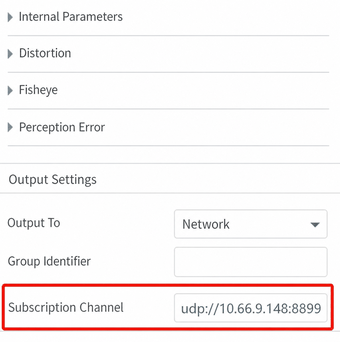
SimOne supports pushing physical-level raw sensor data streams directly to a specified IP and port via UDP, bypassing the SimOneAPI logic layer. Developers can enter the receiver address on the sensor configuration page; SimOne will begin pushing raw data in real time. This is suitable for scenarios where a custom perception algorithm or data processing pipeline is required.
Note
Example directory: [SimOne installation directory]\SimOneAPI\SensorRaw\SensorCamera
Overview
Demo code for physical-level camera data transmission. You can use this code as a reference for sending real-time camera simulation images to your algorithm or controller.
Enter the receiver IP and port on the sensor configuration page; SimOne will send data via UDP.
Receiving Image Frames
Image data is pushed via a callback function and supports multiple formats including RGB, JPEG, H.265, and RLE segmentation maps:
#include <SimOneStreamingAPI.h>
#include <opencv2/opencv.hpp>

// Callback: triggered when each frame of image data arrives
void dataImageCallback(SimOne_Streaming_Image* pImage)
{
    if (pImage->format == ESimOne_Streaming_Image_Format_RGB) {
        // RGB format: construct OpenCV Mat directly
        cv::Mat img(pImage->height, pImage->width, CV_8UC3, pImage->imageData);
        cv::imshow("Camera RGB", img);
    }
    else if (pImage->format == ESimOne_Streaming_Image_Format_JPEG) {
        // JPEG format: construct a buffer Mat, then decode
        cv::Mat imgbuf(pImage->height, pImage->width, CV_8UC3, pImage->imageData);
        cv::Mat img = imdecode(imgbuf, CV_LOAD_IMAGE_COLOR);
        cv::imshow("Camera JPEG", img);
    }
    else if (pImage->format == ESimOne_Streaming_Image_Format_H265) {
        // H.265 format: decode with a decoder, then display
        if (pImage->imageDataSize > 0) {
            decoder.decode((unsigned char*)pImage->imageData, pImage->imageDataSize);
            decoder.play();
        }
    }
}

int main(int argc, char* argv[])
{
    std::string ip = "127.0.0.1";
    int port = 6699;  // Must match the port configured on the sensor configuration page

    // Register the callback; SimOne will push image data to this function in real time
    SimOneAPI::SetStreamingImageUpdateCB(ip.c_str(), port, dataImageCallback);

    while (true) {
        if (cv::waitKey(1) == 27) break;
        std::this_thread::sleep_for(std::chrono::milliseconds(1));
    }
    return 0;
}
Build Environment
CMakeLists.txt supports generating projects for Windows and Ubuntu.
Usage
Run the use case in SimOne, then run the algorithm in Visual Studio.