Developer Quick Start
1. About
SimOne is an autonomous driving simulation and testing platform independently developed by 51SIM. It integrates static and dynamic data import, test scenario editing, sensor simulation, dynamics simulation, visualization, testing and replay, and virtual dataset generation into a unified platform. The platform provides multiple types and languages of API interfaces to enable communication between external algorithm systems and the simulation platform, supporting testing and training of L2/L3/L4 algorithms. The simulation platform achieves full modularity and openness, supporting partial open-loop or full closed-loop testing of perception, fusion, decision-making, planning, and control algorithms. The main application scenarios are as follows:
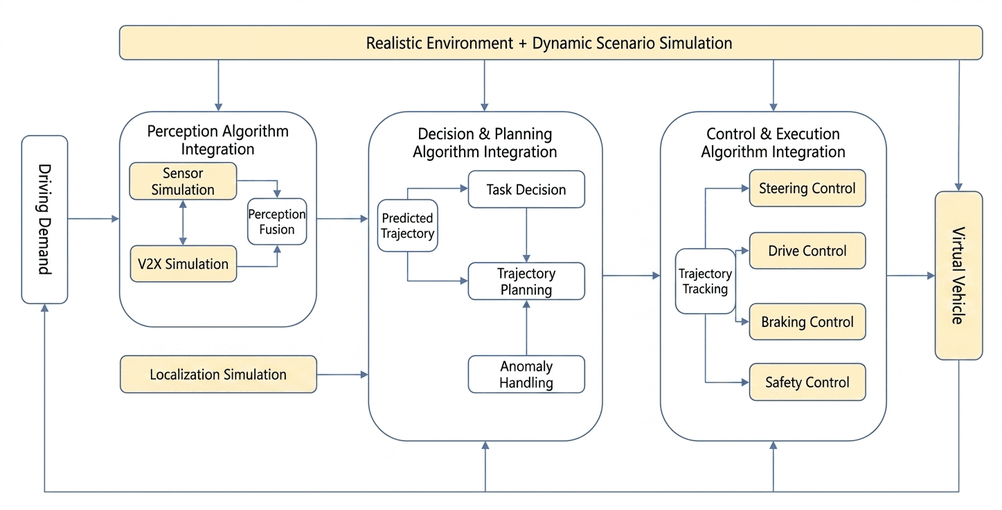
-
Perception Algorithm + Simulation Platform Open-Loop: Supports testing of object detection and prediction, with extensibility for multi-sensor distributed and HIL configurations.
-
Fusion Algorithm + Simulation Platform Open-Loop: Conducts testing and training of perception fusion algorithms by obtaining single-sensor object-level ground truth.
-
Decision, Planning & Control Algorithm + Simulation Platform Open-Loop: Bypasses the perception and fusion modules, using multi-sensor fused object-level ground truth for algorithm testing. Extensible for large-scale cloud deployment and concurrent execution without GPU.
-
Perception + Fusion + Decision + Planning & Control Algorithm + Simulation Platform Closed-Loop: Full end-to-end closed-loop testing, extensible to Vehicle-in-the-Loop (VIL).
2. API Overview
2.1 Multi-Language and Framework Interfaces
| Category | API Interface | Description |
|---|---|---|
| Language Support | C++ | Provides interface support for projects developed in C++. |
| Python | Provides Python language interface support for rapid development and prototyping. | |
| Runtime Control | Restful API | Provides HTTP-based Restful APIs supporting web service interfaces to control SimOne's runtime workflow, such as creating case libraries, importing/exporting cases, and starting/stopping cases. |
| API + Third-Party Middleware | Simulink | Provides Simulink interface support for simulation and model-based design. |
| ROS1/2 | Supports ROS1/2 framework for application development in robotic operating system environments. |
2.2 Feature Support
Note
To view the full API summary list, refer to C++/Python Interface Language Support.
| API Type | API Interface | Features |
|---|---|---|
| 1. Basic Service Primarily provides vehicle selection, simulation work mode configuration, and hotzone data retrieval. |
ServiceAPI | Select Vehicle: Select a specific target vehicle for control and subscribe to its status updates. Set Simulation Work Mode: Choose frame-synchronized mode (ensures real-time performance and stability) or non-frame-synchronized mode (improves execution efficiency) as needed. Get Hotzone Data: Retrieve real-time data of the vehicle and its surrounding environment via active API calls or automatic callbacks. |
| 2. Sensor Provides developers with the ability to retrieve various sensor data from the SimOne simulation environment. |
SensorAPI | Get Object-Level or Physical-Level Data: Includes image data, LiDAR point clouds, millimeter-wave radar, and ultrasonic radar object-level data. Get Sensor Ground Truth Data: Supports both perception algorithm integration testing and open-loop testing that bypasses perception and connects directly from the decision algorithm. Environment Configuration and Management: Handles retrieval and configuration of simulation environment parameters (e.g., weather, lighting, and road surface conditions), critical for creating specific test scenarios. |
| StreamingAPI | Physical-Level Sensor Streaming: Real-time retrieval and automatic callback of image and point cloud data, supporting multiple formats. | |
| V2XAPI | V2X Message Handling: Retrieve UPER-encoded V2X messages for specific vehicles and receive update notifications. | |
| 3. Planning, Navigation & Control Drives the ego vehicle through control signal inputs to simulate complex traffic scenarios. |
PNCAPI | Vehicle Status and Initialization: Covers selecting the test vehicle, initializing state information, setting the starting position, and resetting vehicle status. Warning Information and Control Strategies: Includes interfaces for setting and receiving warning information, controlling vehicle actions, and outputting planning and control commands, ensuring the test vehicle responds dynamically according to the algorithm. |
| 4. HD Map Runtime Provides centimeter-level high-precision map data for decision algorithms, including road networks and traffic elements, supporting various API calls including path planning and localization. |
HDMapAPI | Map and Lane Analysis: Provides HD map loading and detailed lane information queries to enhance localization and routing capabilities. Environment Recognition and Judgment: Integrates recognition of traffic lights, signs, parking spaces, and other environmental elements to assist in decision-making. |
| 5. Evaluation Algorithm Retrieves basic simulation data required for user-defined evaluation functions and internal signals from the user's planning and control algorithm needed for evaluation. |
EvaluationAPI | Store and Retrieve Evaluation Data: Stores and retrieves data required for user-defined evaluation functions, used by user-defined evaluation algorithms. |
2.3 API Call Examples
Note
The sample code in [SimOne-installation-directory]/SimOne/SimOneAPI is organized by directory and demonstrates the use of various SimOne APIs in client-side algorithm programs.
The links below are primarily API call reference examples. For details, refer to API Call Reference Examples.
| Example | Folder | Description | Subfolder | Description |
|---|---|---|---|---|
| Algorithm Examples | ADAS | Examples of ADAS basic algorithms interfacing with the SimOne simulation platform. | ACC | Adaptive Cruise Control algorithm example. |
| AEB | Automatic Emergency Braking algorithm example. | |||
| AEB-Daemon | AEB algorithm example for continuous case execution in cloud simulation environments. | |||
| AEB-Evaluation | Uses the AEB algorithm as an example to demonstrate how to output signal data required for evaluation within a user algorithm. | |||
| AVP | Automated Valet Parking algorithm example. | |||
| bin | Output directory for ADAS algorithm executables. | |||
| Build | Directory for files generated during project build and compilation. | |||
| LKA | Lane Keeping Assist algorithm example. | |||
| TestEvaluation | Used to test and demonstrate how to use EvaluationAPI to retrieve data required for evaluation. | |||
| TrajectoryControl | System or algorithm for controlling vehicle trajectory. | |||
| util | Directory containing a set of helper tools and utilities. | |||
| Autopilot | Comprehensive autonomous driving algorithm integration. | CurveSample | Global path planning and local path adjustment example. | |
| LimitChangeLaneSample | Example scenario with an obstacle ahead. | |||
| TrafficLightSample | Example of retrieving traffic light phase status from a scenario. | |||
| Libraries | include | Contains SimOne's built-in libraries and third-party dependency files, primarily `.h` and `.hpp` headers. | ||
| lib | Contains dynamic libraries required to run SimOne, C++ API headers and data structure files, Python API headers and data structure files, and Python API algorithm examples. | |||
| Third-Party Middleware Adaptation | Cyber | Example of Apollo (r6.0.0) interfacing with SimOne simulation platform via Cyber middleware. | ||
| Matlab | SimOneAPI encapsulation in Simulink, including module interfaces and examples. | |||
| ROS | Example of interfacing with SimOne simulation platform via ROS1 middleware. | |||
| ROS2 | Example of interfacing with SimOne simulation platform via ROS2 middleware. | |||
| SensorRaw | Physical-level data visualization interface examples. | 3rdparty | Third-party plugins: OpenCV, PCL. | |
| SensorCamera | Physical-level camera data transmission example. | |||
| SensorLidar | Physical-level LiDAR data transmission example. | |||
| SensorLidarROS | Physical-level LiDAR data transmission to ROS example. | |||
| SensorRadar4D | 4D millimeter-wave radar data transmission example. | |||
| Feature Module Examples | Tutorial | Basic SimOneAPI C++ interface usage examples. | Dynamics | Dynamics usage example. |
| HDMap | HDMapAPI usage example. | |||
| PNC | PNCAPI usage example. | |||
| Sensor | Sensor usage example. | |||
| Traffic | Traffic flow API usage example. | |||
| V2X | V2X usage example. | |||