SimOne For HIL_NI User Guide
Note
This guide is intended for engineering teams working on end-to-end HIL rig design, integration, and debugging. It introduces the HIL system architecture for SimOne and NI, and provides usage instructions for the full-chain simulation data flow.
SimOne For HIL (Hardware-in-the-Loop) is a system for building automotive autonomous driving controller hardware-in-the-loop (HIL) test environments on the SimOne simulation platform. It is designed to provide an efficient and reliable test environment for the development and validation of automotive autonomous driving control units (ECUs). With SimOne For HIL, developers can simulate real driving scenarios and vehicle dynamics in a virtual environment, accelerating the ECU development cycle and improving the reliability of intelligent driving controller algorithms.
1. System Requirements
-
SimOne 3.9
-
NI real-time software: VeriStand 2023Q4 or later
-
NI real-time target system: NI Linux RT System Image 2024Q3 or later
2. Network Topology
SimOne For HIL interconnects the SimOne simulation host and the NI real-time target via an Ethernet switch. The PXI interface cards on the NI real-time target convert simulation signals into real automotive bus interfaces and inject them into the intelligent driving domain controller (ECU), forming a complete network topology.
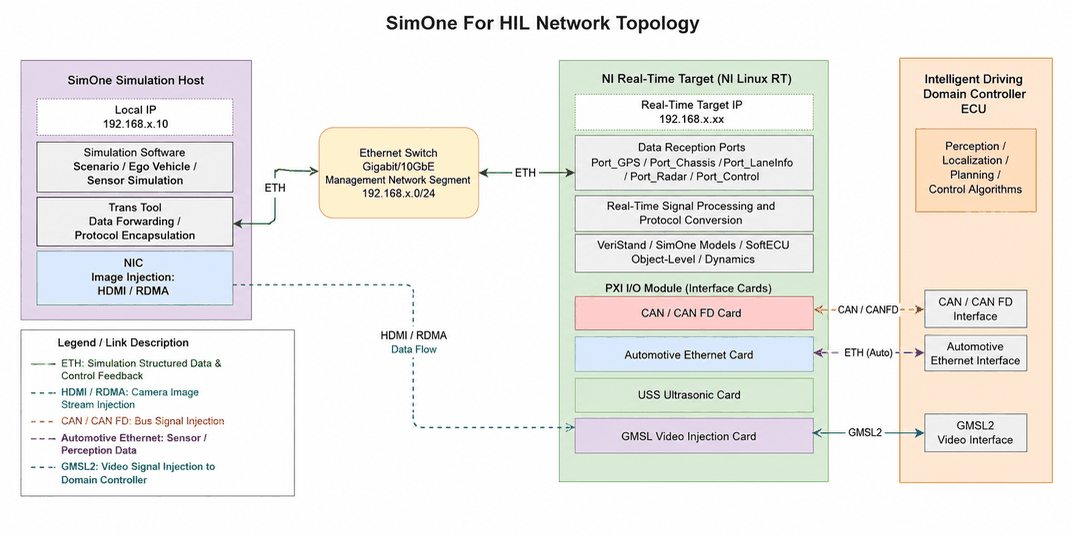
- SimOne Simulation Host: Configured with a local IP (BridgeIO/IP, e.g., 192.168.1.2). Runs the SimOne simulation software and the Trans tool to generate scene, ego vehicle, and sensor simulation data.
- Ethernet Switch: Serves as the switching core for the management network segment (e.g.,
192.168.x.0/24), connecting the simulation host and the real-time target, and carrying ETH transmission of ego vehicle status and structured data. - NI Real-Time Target (NI Linux RT): Configured with the real-time target IP (CD/IP, e.g., 192.168.1.3). Receives simulation data via ports including Port_GPS, Port_Chassis, Port_LaneInfo, Port_Radar, and Port_Control. Runs VeriStand/SimOne Models and SoftECU for real-time signal processing and protocol conversion.
- PXI I/O Modules: Includes CAN/CANFD cards, automotive Ethernet cards, USS ultrasonic cards, and GMSL video injection cards, which convert simulation signals into real sensor interface outputs.
- Intelligent Driving Domain Controller (ECU): Receives injected signals via CAN/CANFD, automotive Ethernet, GMSL2, and other interfaces, and executes perception, localization, planning, and control algorithms.
- Connection Media: ETH links carry simulation and structured data as well as ego vehicle control feedback. HDMI/RDMA links carry camera image stream injection. CAN/CANFD, automotive Ethernet, and GMSL2 links complete signal injection from the NI real-time target to the domain controller to form a closed loop.
2. System Architecture
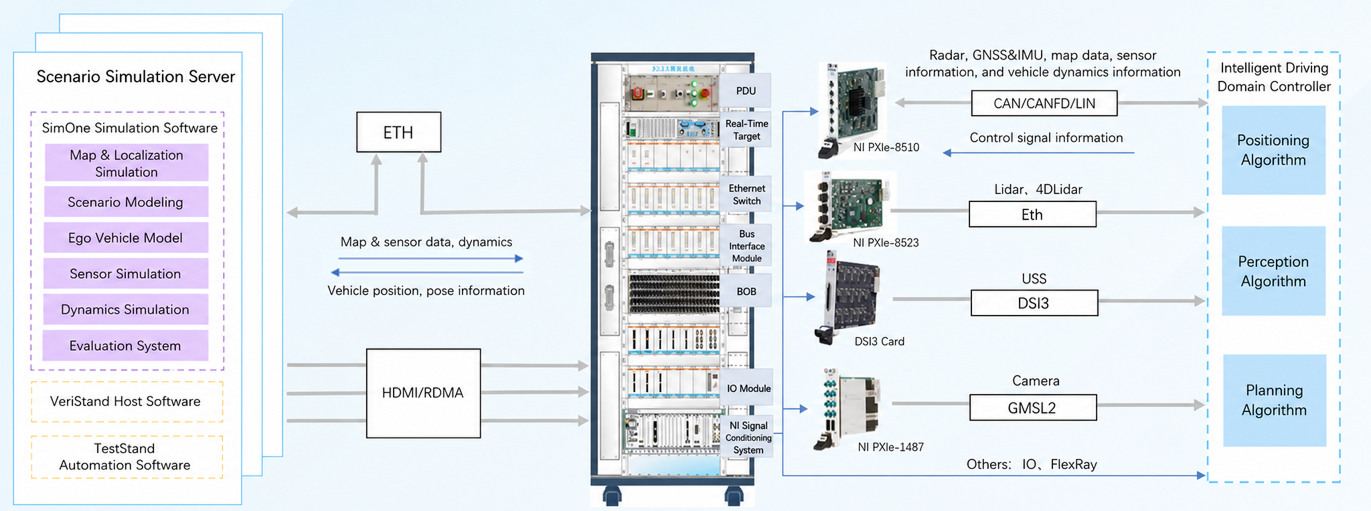
SimOne For HIL is an end-to-end hardware-in-the-loop simulation platform for autonomous driving function verification, achieving seamless integration from virtual simulation to real vehicle algorithms. It consists of three layers:
- Layer 1 — Scene Simulation Server (left): SimOne generates virtual driving scenes, including maps, vehicle dynamics, sensor simulation, and traffic objects. VeriStand and TestStand provide the automated test framework.
- Layer 2 — NI Real-Time I/O Platform (middle): Receives simulation data via ETH/HDMI/RDMA. Multiple PXI modules perform real-time signal processing and I/O control, supporting high-bandwidth data exchange.
- Layer 3 — Sensor Interface and Domain Controller Unit (right): Simulation signals are converted into real sensor interface outputs (CAN/CANFD/automotive Ethernet/GMSL2, etc.) and fed to the intelligent driving domain controller for localization, perception, planning, and control algorithm processing, forming a complete closed-loop verification.
3. Core Component Configuration
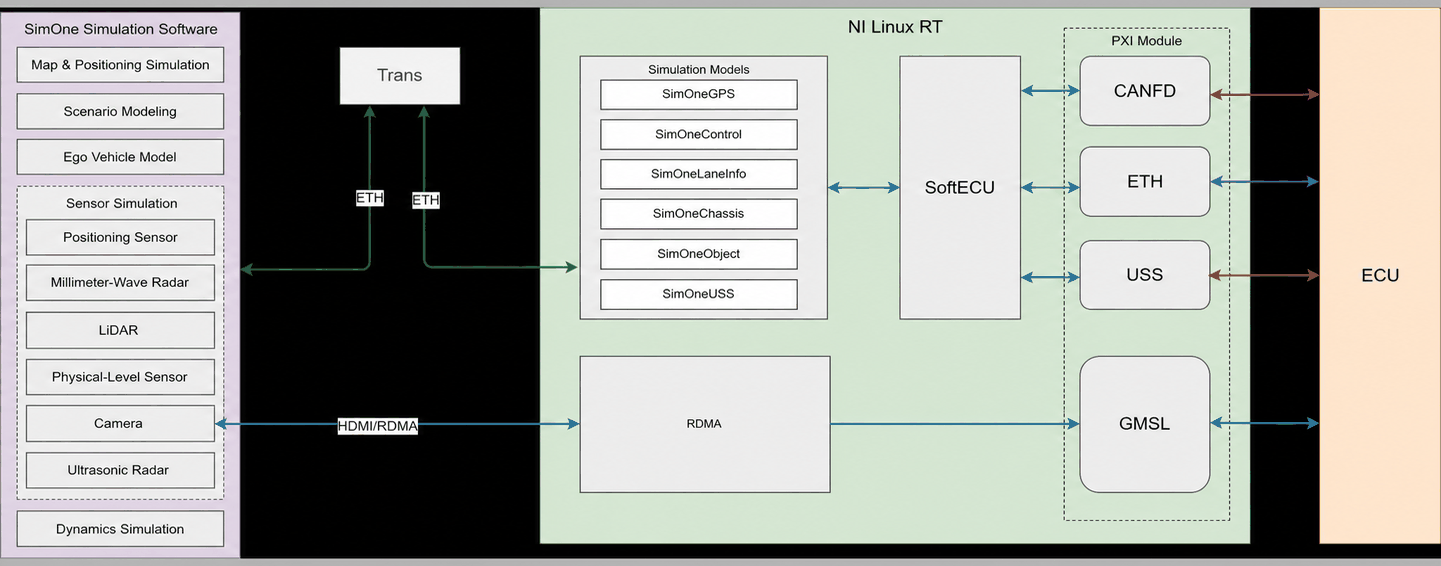
The closed loop of the entire data chain depends on the coordinated operation of four core components: SimOne Ego Vehicle, SimOne Scene, Trans Tool, and SimOne Model. The data flow is as follows:
- Structured data: The SimOne ego vehicle and scene generate simulation data, which is transmitted to the NI real-time platform via the Trans tool for processing.
- Image stream data: Transmitted directly to the NI real-time target via HDMI or RDMA.
- Sensor interface output: The real-time target converts simulation signals into various automotive sensor interfaces (Radar, GPS/IMU, Lidar, Camera, etc.) and feeds them to the intelligent driving domain controller for algorithm validation, forming a complete closed loop.
3.1 SimOne Ego Vehicle
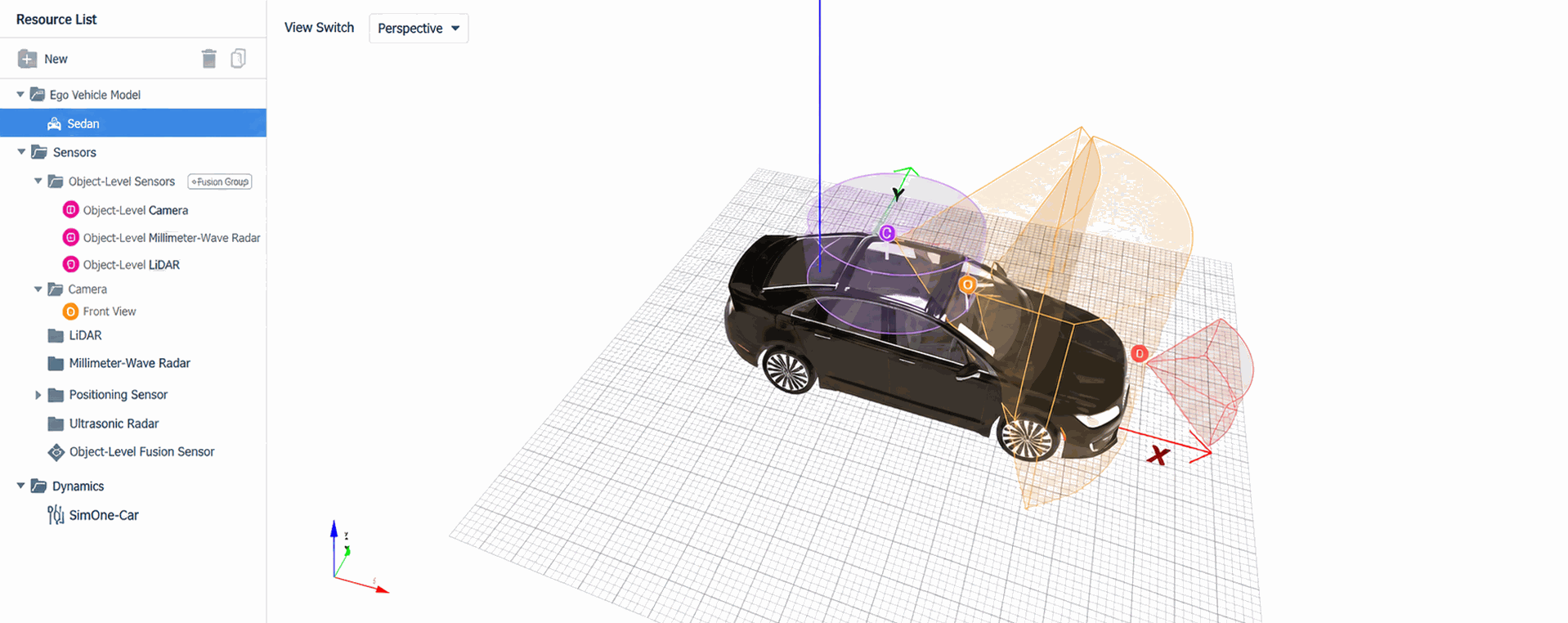
The SimOne simulation ego vehicle must be configured with the required sensors and their parameters to ensure simulation data is generated correctly.
3.2 SimOne Scene
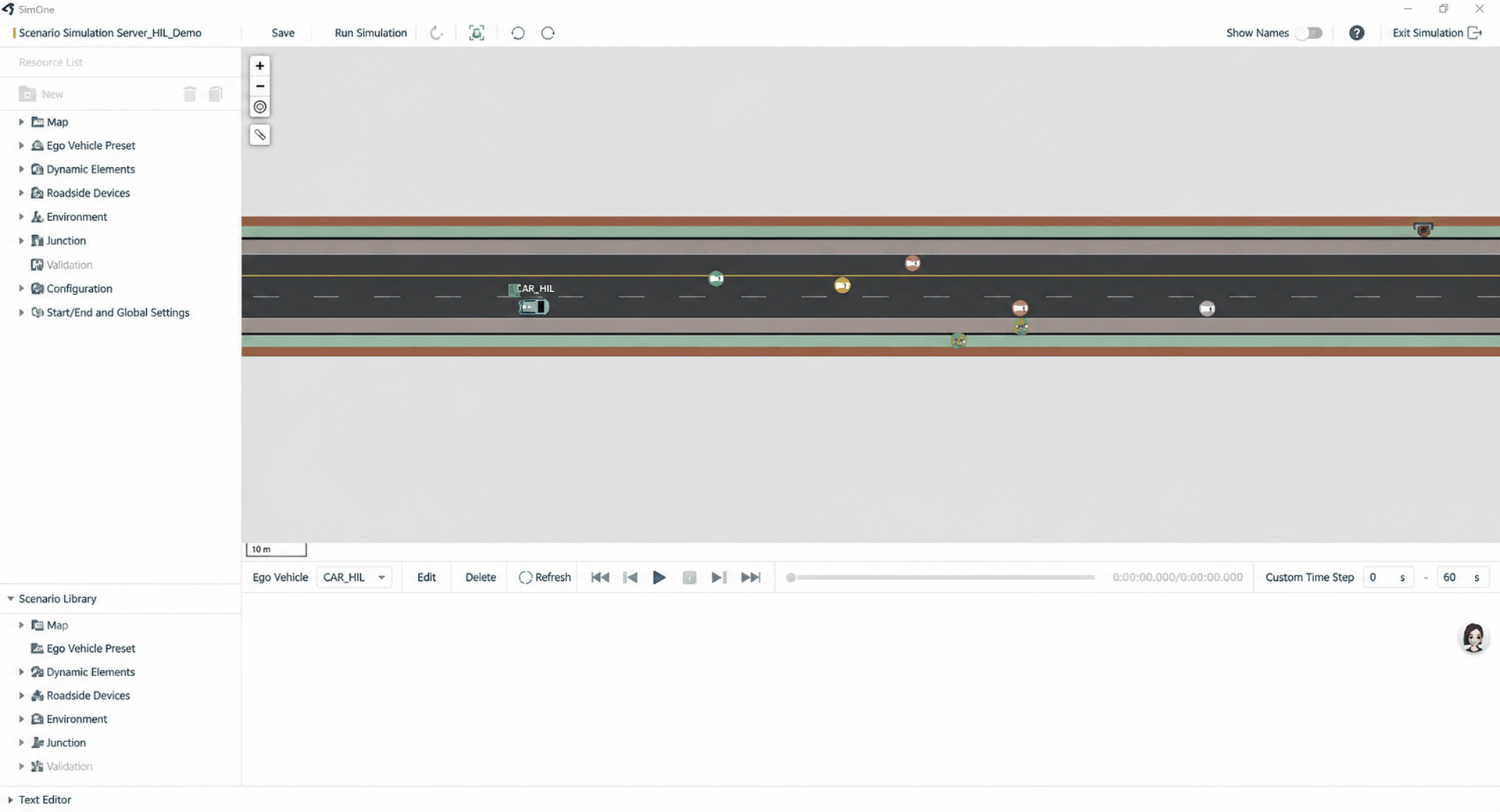
The SimOne simulation scene provides scene data including maps, ego vehicle behavior, static and dynamic elements, traffic flow, judgments, and environmental conditions.
3.3 Trans Tool
Tip
The Trans tool is located in the installation directory at: .\SimOne\Soultion\HIL\Release For NI HIL
TransForHIL is a key component in the HIL system for acquiring SimOne simulation data and forwarding it to the real-time target. It supports conversion of multiple data formats and communication protocols to ensure that simulation data is transmitted correctly to the real-time target.
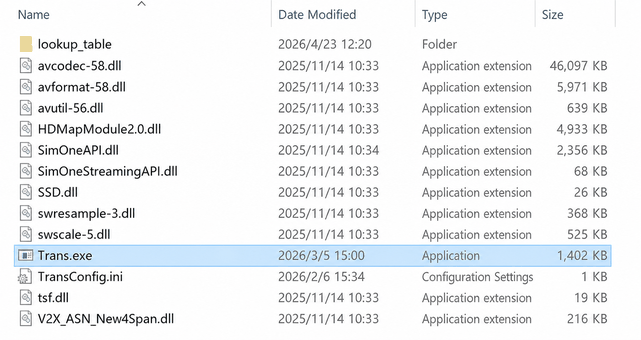
Trans tool configuration parameters:
| Parameter | Description |
|---|---|
| BridgeIO/IP | Local IP of the SimOne host |
| CD/IP | IP of the real-time target |
| Port_Control | Port for Trans to receive ego vehicle control commands sent by the real-time target |
| Port_Radar | Port for the real-time target to receive millimeter-wave radar data |
| Port_GPS | Port for the real-time target to receive GPS data |
| Port_LaneInfo | Port for the real-time target to receive lane information |
| Port_Chassis | Port for the real-time target to receive chassis data |
3.4 SimOne Model
SimOne Model is deployed to the NI real-time target via VeriStand. It receives simulation data sent by the Trans tool, parses it, and provides it to SoftECU as signal I/O within VeriStand for processing. It serves as a critical bridge for closing the HIL data chain loop.
Data types for each Model:
| Model Name | Description |
|---|---|
| SimOneControl | Receives ego vehicle control commands from the real-time target and forwards them to the SimOne ego vehicle for simulation updates |
| SimOneRadar | Receives object-level millimeter-wave radar data and provides it to SoftECU for processing |
| SimOneGPS | Receives GPS data and provides it to SoftECU for processing |
| SimOneLaneInfo | Receives lane information and provides it to SoftECU for processing |
| SimOneChassis | Receives chassis data and provides it to SoftECU for processing |
3.5 Data Channel Reference
The correspondence between Trans ports, SimOne Models, and detailed usage instructions for each data channel is as follows:
| Data Channel | Trans Port | SimOne Model | Detailed Instructions |
|---|---|---|---|
| Ego vehicle control | Port_Control | SimOneControl | Ego Vehicle Control |
| Camera | HDMI/RDMA (direct connection) | — | Camera Sensor |
| Object-level millimeter-wave radar | Port_Radar | SimOneRadar | Object-Level Sensor |
| GPS/IMU | Port_GPS | SimOneGPS | GPS/IMU Sensor |
| Lane information | Port_LaneInfo | SimOneLaneInfo | Lane Information |
| Chassis information | Port_Chassis | SimOneChassis | Chassis Information |
For issues encountered during use, refer to FAQ.