V2X Example
V2XADAS
Note
Example directory: [SimOne installation directory]\SimOneAPI\Tutorial\V2X\V2XADAS
Algorithm Overview
The national standard defines five V2X message types: BSM, RSI, RSM, SPAT, and MAP.
| Abbreviation | Full Name | Type | Description | Use Cases |
|---|---|---|---|---|
| BSM | Basic Safety Message | V2V | Contains basic vehicle information such as speed, heading, and brake status. | Lane-change warning, blind-spot warning, intersection collision warning, etc. |
| RSI | Road Side Information | V2I | Road-side information used to alert upcoming events or road conditions. | Road construction, speed limit alerts, speeding warnings, bus lane warnings, etc. |
| RSM | Road Safety Message | V2I | Road-side safety messages provided by edge devices. | Event detection alerts such as accidents, vehicle anomalies, and foreign object intrusion. |
| SPAT | Signal Phase and Timing | V2I | Traffic light phase and timing information. | Speed guidance, green wave navigation, etc. |
| MAP | MAP Message | V2I | Provides intersection map description and its relationship with traffic signals. | Assists SPAT messages to provide intersection navigation and traffic signal phase guidance. |
The SimOne V2X sensor node consolidates internal perception data, traffic flow, road-side devices, and road network data, converts them into the corresponding national standard V2X message formats, and outputs them via the SimOne V2X API to ADAS algorithms that consume V2X messages for training purposes.
Algorithm Flow
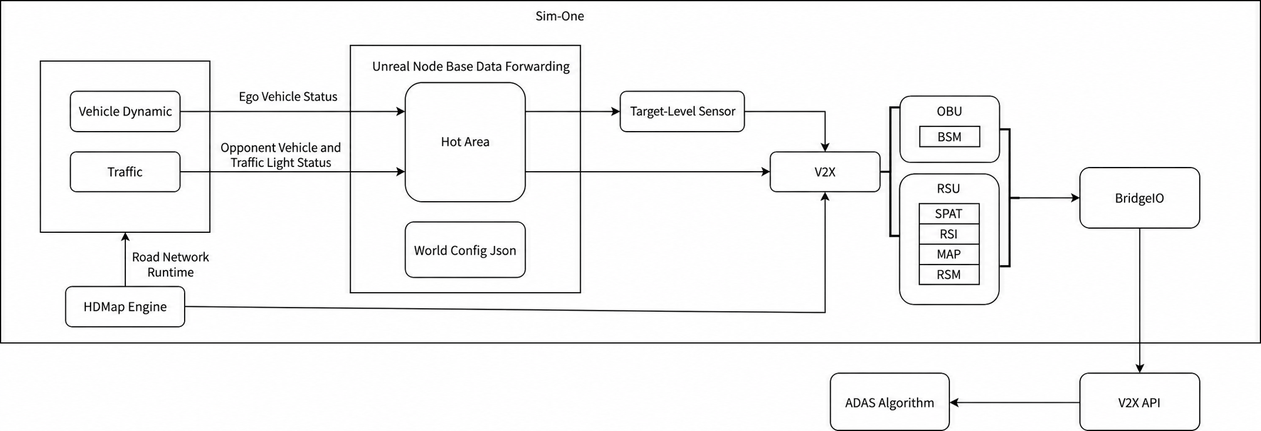
V2X API
-
[SimOne installation path]/SimOne/SimOneAPI/include/SimOneV2XAPI.h
-
Pseudocode example:
// Ego vehicle ID
 const char* mv_id = "0";
 // Whether to join frame synchronization
 bool isJoinTimeLoop = false;
 // BridgeIO service IP
     const char* serverIP = "127.0.0.1";
 // Initialize SimOneAPI
 InitSimOneAPI("0", isJoinTimeLoop, serverIP);

 // Retrieve ground truth data via callback
if (IsCallBackMode) {
             auto function = [](const char* mainVehicleId, const char* sensorId, SimOne_Data_V2XNFS *pDetections) {
                     std::cout << "sensorId:" << sensorId << std::endl;
      std::cout <<" SetV2XInfoUpdateCB strlen= " << pDetections->V2XMsgFrameSize << std::endl;
      std::cout  << "MsgFrameData: " << pDetections->MsgFrameData << std::endl;
             };

   // Register a callback to receive UPER-encoded V2X message updates for the specified vehicle
             SetV2XInfoUpdateCB(function);
     }
     else {
             std::unique_ptr<SimOne_Data_V2XNFS> pDetections = std::make_unique<SimOne_Data_V2XNFS>();
             while (true)
   {
                // Retrieve the UPER-encoded V2X message for the specified vehicle
                     if (GetV2XInfo(mv_id, "obu1" /*V2X Sensor ID*/, ESimOne_V2X_MessageFrame_PR::ESimOne_V2X_MessageFrame_PR_rsiFrame /* V2X message type */, pDetections.get()))
      {
                             std::cout << "GetV2XInfo strlen = " << strlen(pDetections->MsgFrameData) << std::endl;
         std::cout << "MsgFrameData: " << pDetections->MsgFrameData << std::endl;
                             std::this_thread::sleep_for(std::chrono::milliseconds(20));
                     }
                     else {
                             std::cout << "GetV2XInfo Fail" << std::endl;
                     }
                     std::this_thread::sleep_for(std::chrono::milliseconds(10));
             }
     }
Build Environment
CMakeLists.txt supports generating projects for Windows and Ubuntu.
- V2X Tutorial project directory structure:
Tutorial
 ├── bin
 │   ├── DynamicsTest
 │   ├── HDMap
 │   ├── logServer.txt
 │   ├── log_taskImage.txt
 │   ├── PNCSample
 │   ├── SensorSample
 │   └── SensorV2X
 ├── Build
 │   ├── build_debug.bat
 │   ├── build_release
 │   ├── build_release.bat
 │   ├── CMakeLists.txt
 │   ├── gen_make_debug.sh
 │   ├── gen_make_release.sh
 │   ├── gen_vs_proj_debug.bat
 │   ├── gen_vs_proj_release.bat
 │   ├── rebuild_debug.sh
 │   └── rebuild_release.sh
 └── V2X
     └── V2XADAS

bin:   Output directory
Build: Build directory
HDMap: HDMap API example source directory
Build:
CMakeLists.txt supports generating projects for Windows and Ubuntu.
-
Windows:
-
Enter the
Builddirectory and rungen_vs_proj_debug.batorgen_vs_proj_release.batto generate a Visual Studio project. -
Open the Visual Studio project and build the
V2Xproject. -
Linux:
-
cd Build -
./gen_make_debug.sh(or./gen_make_release.sh) -
cd build_debug(orcd build_release) -
make -j4
Usage
-
API testing:
-
Start SimOne and create a new use case (configure OBU for traffic participants in the use case).
-
Create a new ego vehicle (enable OBU and set the control mode to Manual / API Control).
-
Run the use case (select the ego vehicle).
-
Build the test code; the executable is generated in the
bindirectory. -
Run the example program and view the results.