Overview
Note
Official website 👉 https://www.51sim.com
1. About SimOne
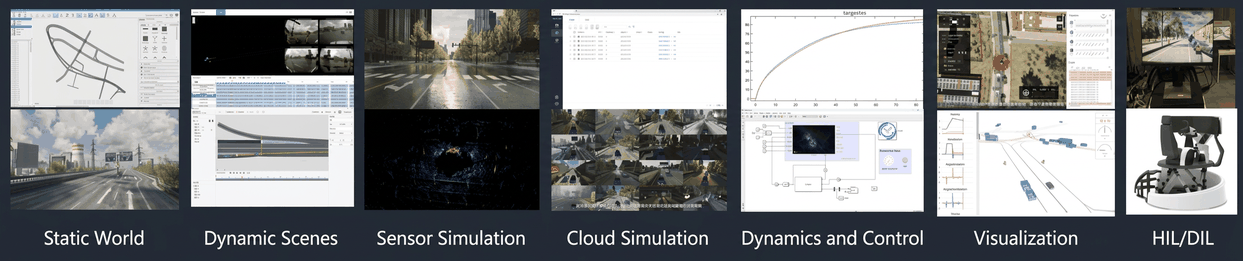
SimOne is an integrated autonomous driving simulation and testing platform independently developed by 51SIM. It combines static and dynamic data import, test scenario use case editing, sensor simulation, dynamics simulation, visualization, testing and playback, and virtual dataset generation into a single platform. Its functional modules cover the entire autonomous driving simulation and testing workflow, delivering scale, high precision, and high fidelity. Built on a flexible and scalable distributed parallel simulation architecture, SimOne can be deployed in standalone, private cloud, and public cloud environments. It is used for the research, testing, and validation of autonomous driving products, enabling users to rapidly accumulate autonomous driving experience, ensure product performance, safety, and reliability, accelerate development cycles, and reduce costs.
2. SimOne Overview
2.1 Static Scenarios
SimOne supports importing standard OpenDRIVE 1.4 format map files to automatically construct static scenarios. 51SIM also offers WorldEditor, an independently developed scenario-building tool that can quickly create OpenDRIVE-based road networks from scratch, or reconstruct road network information from real-world data such as point clouds or map imagery.
2.2 Dynamic Scenarios
SimOne's built-in use case editor supports creating multiple types of test use cases, including standard use cases, traffic flow use cases, and playback use cases. SimOne also supports importing real-world data collected from various sources — such as vehicle-side, roadside, and drone-captured data — to generate data-driven use cases. Users can also import standard OpenSCENARIO format dynamic scenario files to generate OpenSCENARIO test use cases.
Note
SimOne currently supports OpenSCENARIO 2.0, 1.2, and OpenDRIVE 1.4.
2.3 Use Case Library
SimOne includes a built-in library of hazardous scenario use cases and industry-standard use cases for rapid testing of autonomous driving algorithms.
2.4 Sensor Simulation
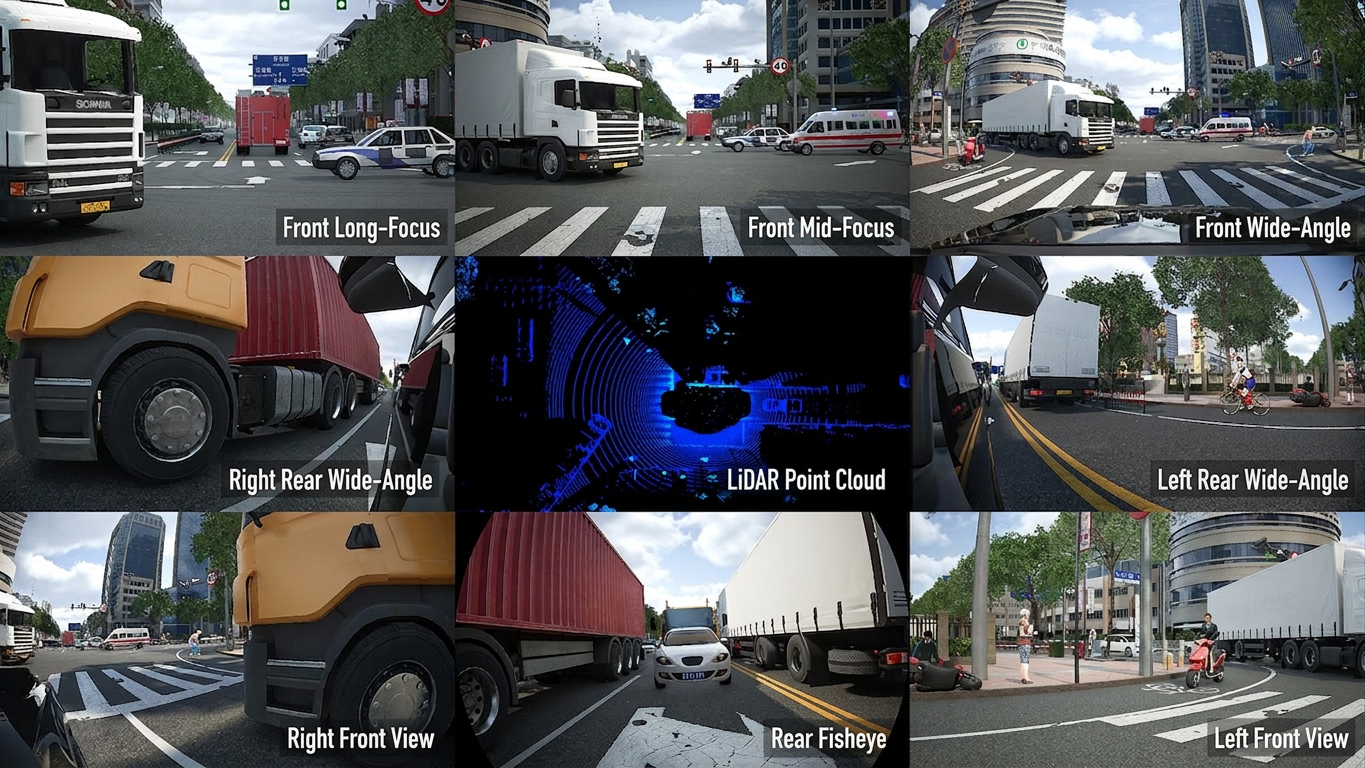
SimOne supports multi-channel simulation of both general-purpose and custom sensors for testing and training perception system algorithms, and also supports various hardware-in-the-loop testing requirements.
2.5 Control System Simulation
SimOne provides a rich set of interfaces for connecting to your control system, including but not limited to Matlab/Simulink, ROS/LCM/Protobuf-based interfaces, steering wheels, and simulators for manual driving input. SimOne supports multiple integration modes: you can choose to connect only the perception system for object recognition and prediction testing, bypass the perception system and connect directly at the decision system input, or connect both simultaneously for end-to-end testing and training.
2.6 Dynamics Simulation
SimOne provides a proprietary dynamics system that allows full customization of vehicle dynamics parameters, including vehicle appearance and dimensions, powertrain, tires, steering system, and suspension characteristics. SimOne also supports integration with third-party dynamics software such as CarSim and CarMaker for more complex dynamics simulation.
3. Test Modes
SimOne offers a variety of test modes to meet different customer needs.
Note
The following applies to Collaboration Edition (Client) and Enterprise Edition.
3.1 Decision & Control Closed-Loop Test
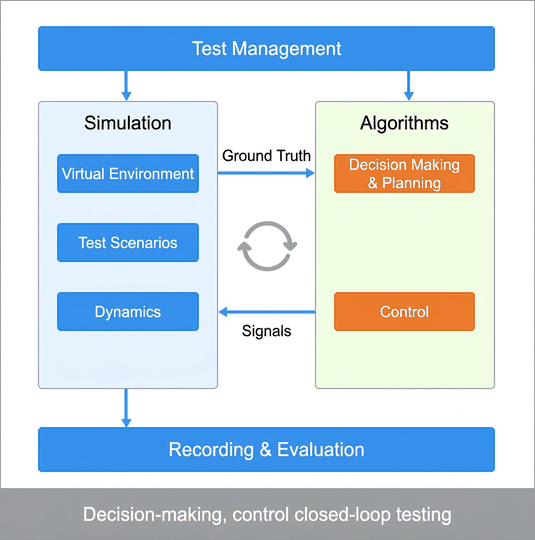
SimOne outputs ground truth or object signals directly to the connected decision algorithm. After the decision algorithm completes its decision based on the object signals, the control algorithm sends control signals back to SimOne, forming a small closed test loop.
3.2 Perception Open-Loop Test
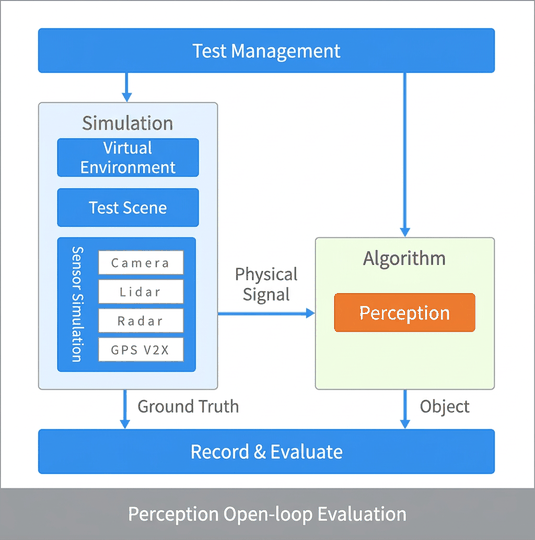
SimOne generates physical sensor signals and injects them into the perception algorithm via software or hardware injection. The perception algorithm outputs its recognition results. SimOne then compares the perception algorithm's results against the ground truth in the simulation scenario to evaluate recognition accuracy and generate a test report.
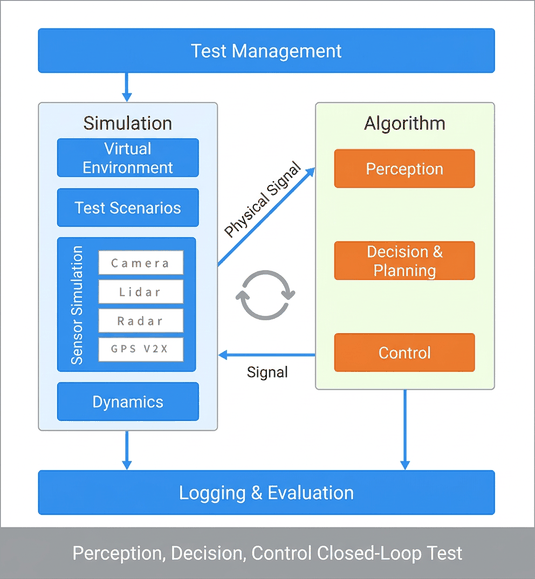
3.3 Perception, Decision & Control Closed-Loop Test
SimOne outputs physical signals to the connected perception algorithm. The perception algorithm sends its recognition results to the decision algorithm. After the decision algorithm completes its decision, the control algorithm sends control signals back to SimOne, forming a complete closed test loop.
Note
The following applies to Collaboration Edition (Cloud).
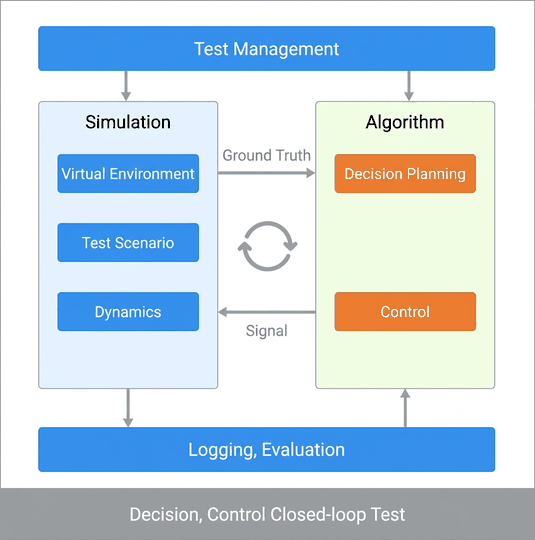
3.4 Decision & Control Closed-Loop Test
SimOne outputs ground truth or object signals directly to the connected decision algorithm. After the decision algorithm completes its decision based on the object signals, the control algorithm sends control signals back to SimOne, forming a small closed test loop.
4. User Workflow
This section helps you quickly understand the overall SimOne workflow. If you prefer to get started immediately, proceed to Quick Start.
4.1 Main User Workflow
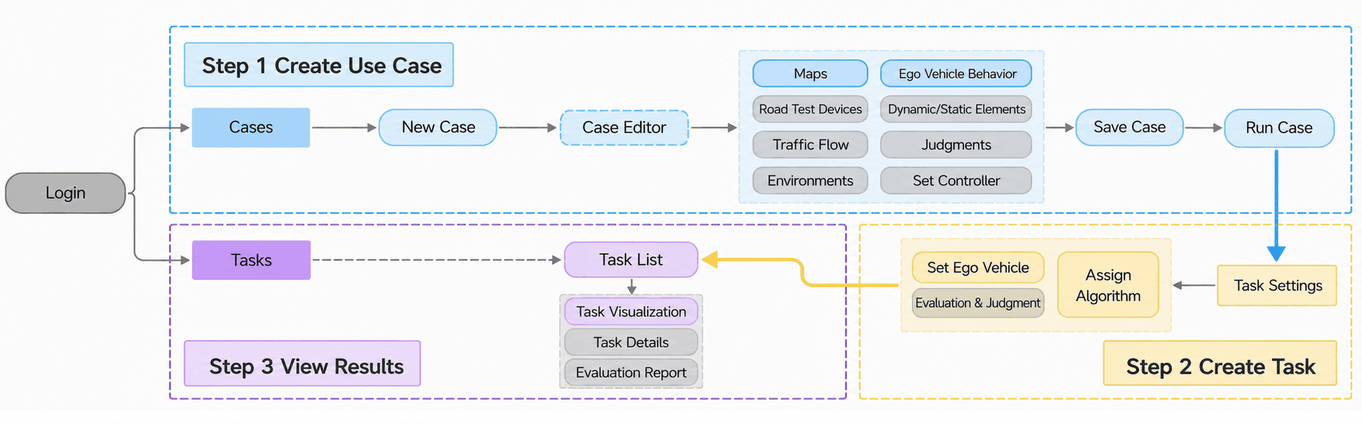
The simplified user workflow consists of three steps:
Step 1 — Create a Use Case
In the Cases page, create a new use case, open the use case editor, configure the map and ego vehicle behavior, save the use case, and run it.
Step 2 — Create a Task
Go to the task settings page to configure the ego vehicle, algorithm, and other parameters.
Step 3 — View Results
Monitor the task run in the task list, including the visualization window and detailed task results.
4.2 Full User Workflow
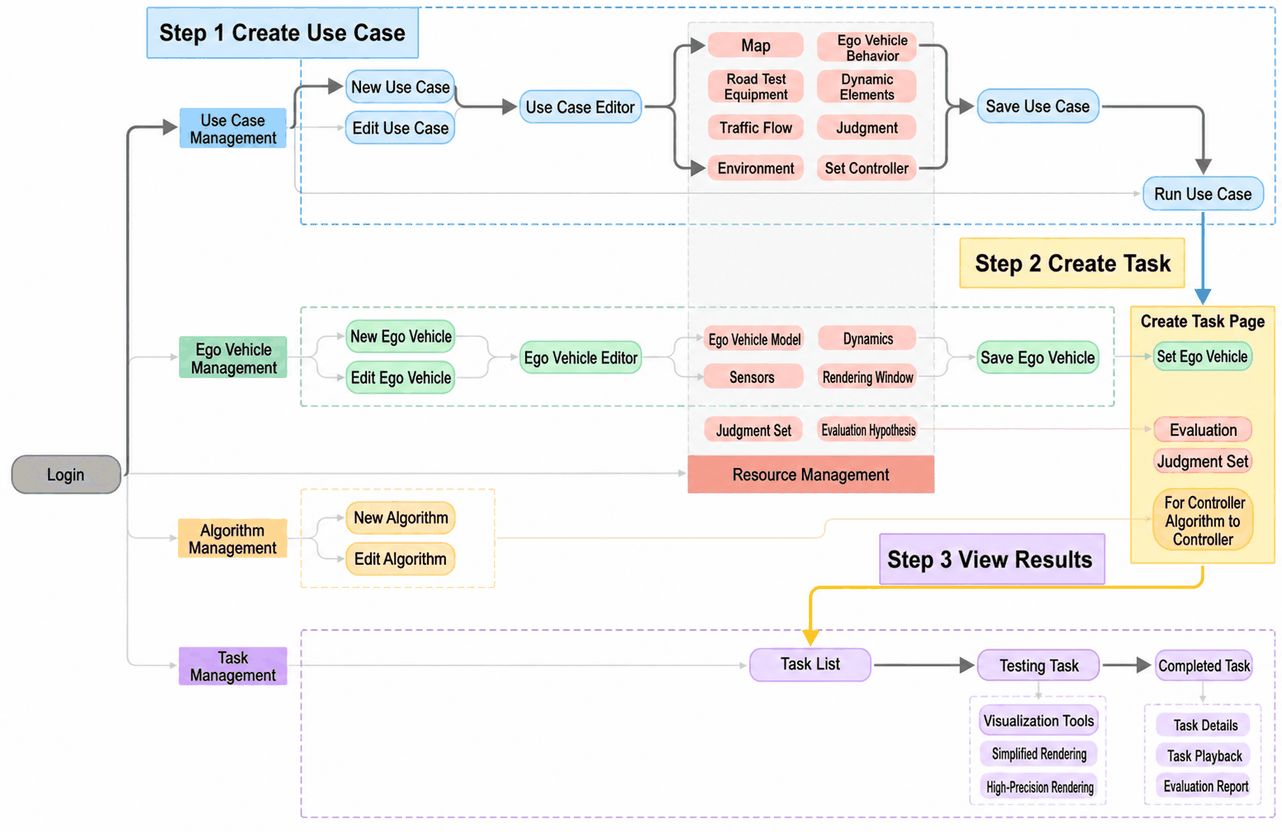
Beyond the main SimOne workflow above:
- Assets used in use cases all come from the Assets page.
- The Ego Vehicle can be configured in the Ego Vehicle page, including the ego vehicle model, dynamics, sensors, and render view.
- Algorithms can be imported and edited in the Algorithms page.
5. Product Lines
5.1 Collaboration Edition & Enterprise Edition
| Category | Feature | Collaboration Edition (Client) | Collaboration Edition (Cloud) | Enterprise Edition | |
|---|---|---|---|---|---|
| Authentication | Verification Method | Username + Password + USB Dongle | Username + Password | USB Dongle | |
| Admin Backend | ❌ | ✅ | ❌ | ||
| System Configuration | Data Storage | Server-side storage + Local storage | Server-side storage | Local storage | |
| Team Collaboration (Data Sharing) | Pay-per-use | Pay-per-use | / | ||
| Concurrent Simulation | Pay-per-use | Pay-per-use | 1 channel | ||
| Distributed Node Support | ✅ | ✅ | ✅ | ||
| Visualization Tool | High-Fidelity (UE) | ✅ | ❌ | ✅ | |
| Lightweight (Web) | ✅ | ✅ | ✅ | ||
| Cases | Scenario Management | ✅ | ✅ | ✅ | |
| Max Use Cases Supported | Unlimited | Unlimited | Unlimited | ||
| Scenario Editor | ✅ | ✅ | ✅ | ||
| Traffic Flow Simulation | Traffic Flow Simulation | ✅ | ✅ | ✅ | |
| Third-Party Traffic Flow Co-Simulation | ❌ | ❌ | ✅ | ||
| Ego Vehicle | Ego Vehicle Editor | ✅ | ✅ | ✅ | |
| Max Ego Vehicle Configurations | Unlimited | Unlimited | Unlimited | ||
| Dynamics | Dynamics Simulation | ✅ | ✅ | ✅ | |
| Third-Party Dynamics Co-Simulation | ✅ | ❌ | ✅ | ||
| Sensors | Vehicle-Side Sensors | Unlimited | Unlimited | Unlimited | |
| Roadside Sensors | ❌ | ❌ | ✅ | ||
| Dump Dataset | ✅ | ❌ | ✅ | ||
| Driving Mode | ❌ | ❌ | ✅ | ||
| Multi-Vehicle Interaction | ❌ | ❌ | ✅ | ||
| V2X Simulation | ❌ | ❌ | ✅ | ||
| Algorithms | Manual Control | ✅ | ✅ | ✅ | |
| API Algorithm Integration | ✅ | ❌ | ✅ | ||
| SimOneDriver Algorithm | ✅ | ✅ | ✅ | ||
| Driving Simulator | ❌ | ❌ | ✅ | ||
| Simulink Algorithm Integration | ✅ | ❌ | ✅ | ||
| Tasks | Evaluation System | ✅ | ✅ | ✅ | |
| Test Report | ✅ | ✅ | ✅ | ||
| Assets | Built-in Resources | ✅ | ✅ | ✅ | |
| External Resource Import | Custom Maps | ✅ | ✅ | ✅ | |
| Import Model Resources | ✅ | ✅ | ✅ | ||
| External Models & Art Scenes | ❌ | ❌ | ✅ | ||