Lidar — Physical-Level Raw Data Ingestion
Note
Example directory: [SimOne installation directory]\SimOneAPI\SensorRaw\SensorLidar
Overview
Demo code for physical-level Lidar data transmission. You can use this code as a reference for sending real-time Lidar simulation point cloud data to your algorithm or controller.
Enter the receiver IP and port on the sensor configuration page; SimOne will send data via UDP.
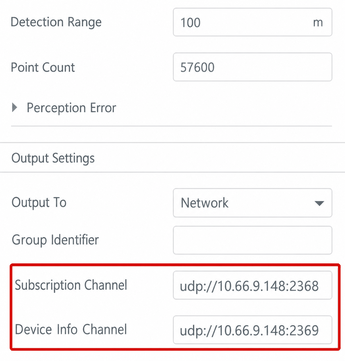
Receiving Point Cloud Data
#include <SimOneStreamingAPI.h>
#include "visualization/cloud_viewer.h"

std::string gIP = "127.0.0.1";
unsigned short gInfoPort = 7788;
unsigned short gPort = 6699;
SimOne_Streaming_Point_Cloud gDataPointCloud;
std::mutex gDataPointCloudMutex;

// Callback: triggered when each frame of point cloud data arrives (called from a separate thread)
void dataPointCloudCallback(SimOne_Streaming_Point_Cloud* pPointCloud)
{
    std::lock_guard<std::mutex> lock(gDataPointCloudMutex);
    gDataPointCloud.frame = pPointCloud->frame;
    gDataPointCloud.pointCloudDataSize = pPointCloud->pointCloudDataSize;
    gDataPointCloud.pointStep = pPointCloud->pointStep;
    memcpy(&gDataPointCloud.pointCloudData, &pPointCloud->pointCloudData,
           pPointCloud->pointCloudDataSize);
}

int main(int argc, char* argv[])
{
    // Register the callback, passing IP, data port, and info port
    SimOneAPI::SetStreamingPointCloudUpdateCB(
        gIP.c_str(), gPort, gInfoPort, dataPointCloudCallback);

    // PCL visualization (color points by intensity in XYZI format)
    int lastFrame = 0;
    while (true) {
        std::lock_guard<std::mutex> lock(gDataPointCloudMutex);
        if (gDataPointCloud.frame != lastFrame &&
            gDataPointCloud.pointStep == sizeof(SimOne_Streaming_Point_XYZI))
        {
            int pointCount = gDataPointCloud.pointCloudDataSize / gDataPointCloud.pointStep;
            SimOne_Streaming_Point_XYZI* pPoint =
                (SimOne_Streaming_Point_XYZI*)gDataPointCloud.pointCloudData;
            // Iterate points: pPoint->x, pPoint->y, pPoint->z, pPoint->intensity
            for (int i = 0; i < pointCount; i++, pPoint++) {
                // Map intensity to color and write to visualization point cloud ...
            }
            lastFrame = gDataPointCloud.frame;
        }
    }
    return 0;
}
Build Environment
CMakeLists.txt supports generating projects for Windows and Ubuntu.
Usage
Run the use case in SimOne, then run the algorithm in Visual Studio.
LidarROS — Lidar ROS Format
Note
Example directory: [SimOne installation directory]\SimOneAPI\SensorRaw\SensorLidarROS
Overview
Demo code for forwarding physical-level Lidar data to ROS. You can use this code as a reference for sending real-time Lidar simulation point cloud data to your ROS system.
Enter the receiver IP and port on the sensor configuration page; SimOne will send data via UDP.
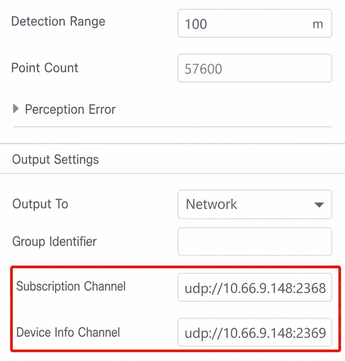
Build Environment
CMakeLists.txt supports generating projects for Windows and Ubuntu.
Usage
Run the use case in SimOne, then run the algorithm in Visual Studio.