Resource Management (Maps and Elements)
The Resource Management module is used to manage the various scene elements required for simulation, including maps, ego vehicle and prop models, custom models, board models, external scenes, and the built-in resource library. This module allows you to import and switch between different simulation environments and element resources, providing a rich set of test scenario assets for simulation test cases.
Chapter Contents
| Section | Description |
|---|---|
| Import Maps and UE External Scenes | Import WorldEditor maps, third-party OpenDRIVE maps, and UE external scenes (Enterprise Edition) |
| External Ego Vehicle and Prop Import | Import plug-in ego vehicle models and prop models (Enterprise Edition) |
| Custom Model Import | Import custom models as dynamic or static elements (Enterprise Edition) |
| Board Model Import | Import images as dynamic or static elements; supports calibration boards (Enterprise Edition) |
| Built-in Resources | View and use the platform's built-in scene element resource library |
Interface Overview
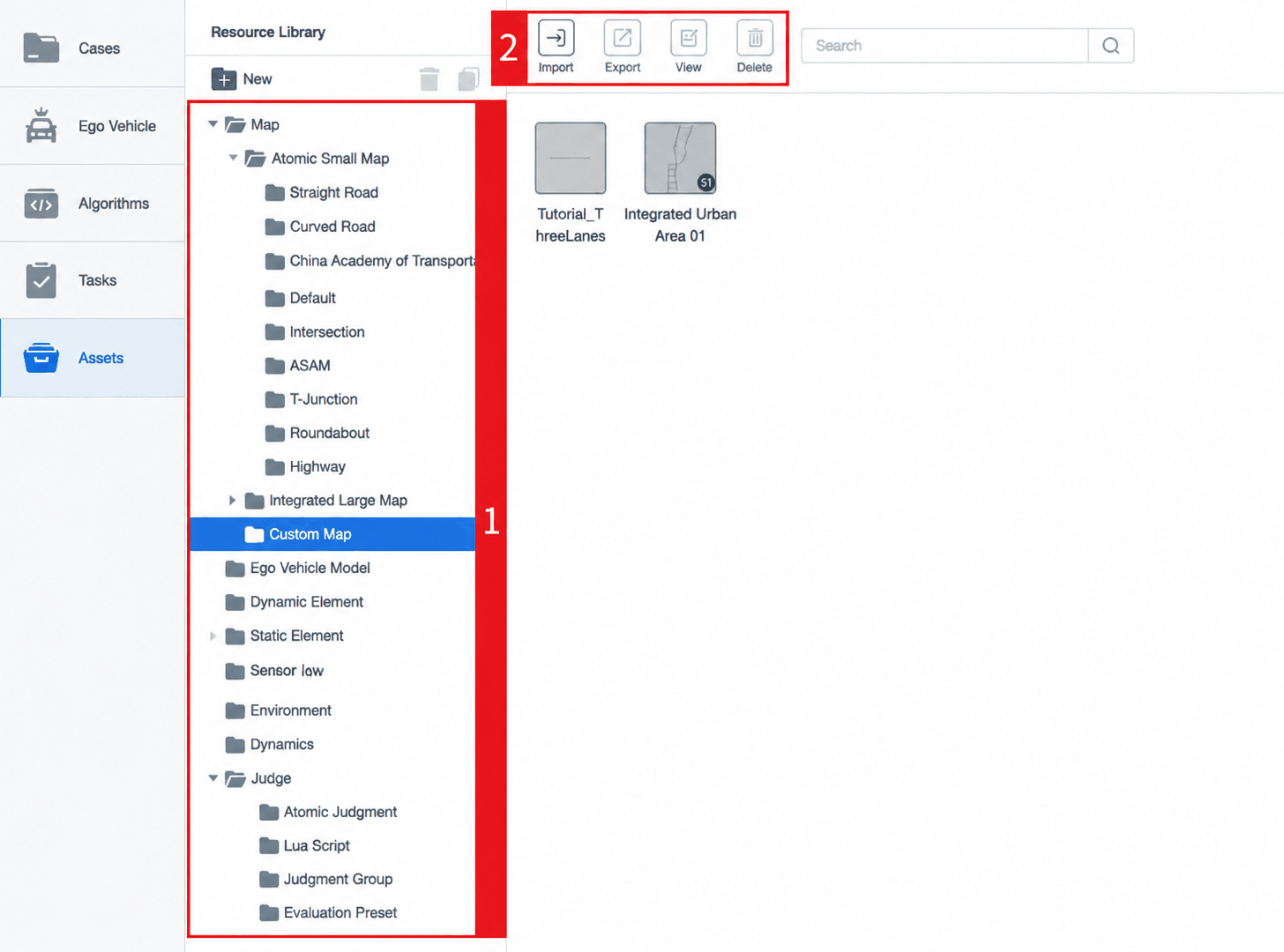
| ID | Item | Description |
|---|---|---|
| 1 | Test Case Resource Library List | The resource library list contains all types of resources needed to edit test cases. Click a resource folder on the left to display its contents on the right. |
| 2 | Resource Library Action Buttons | Includes Import, Export, Edit, and Delete buttons. These buttons become active when the selected item on the left supports the corresponding operation. |
| 2.1 | Import | Click to open the import dialog. Currently supports importing map resources, dynamic elements, and static element resources from external sources. |
| 2.2 | Export | Click to export resources from the system, enabling collaborative workflows. Currently supports exporting non-built-in custom map resources. |
| 2.3 | Edit | Select a resource and click Edit to enter that resource's edit mode. Currently supports editing non-built-in custom resources. |
| 2.4 | Delete | Non-built-in resources can be freely deleted. |