PNC Example
Note
Example directory: [SimOne installation directory]\SimOneAPI\Tutorial\PNC
Algorithm Overview
The decision-planning-control algorithm uses target-level ground truth data from multi-sensor fusion to validate algorithm performance. The SimOne ego vehicle control API supports multiple drive modes — discrete pose, throttle/brake/steering, and planned trajectory — enabling algorithm control commands to be fed into the SimOne simulation system via the API to verify ego vehicle control accuracy.
Algorithm Flow
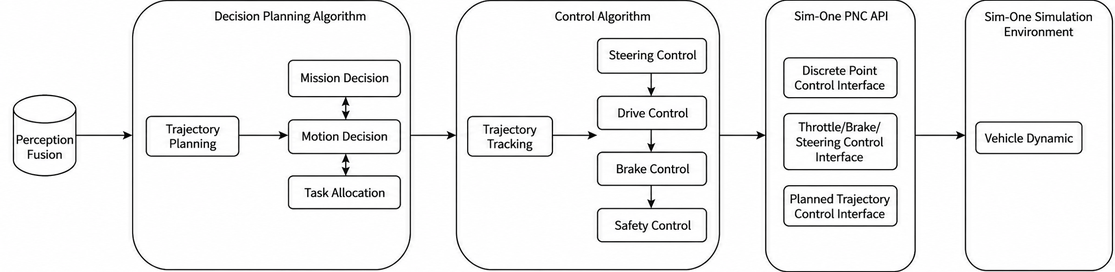
PNC API
-
[SimOne installation path]/SimOne/SimOneAPI/include/SimOnePNCAPI.h
-
Pseudocode example:
// Ego vehicle ID
 const char* mv_id = "0";
 // Whether to join frame synchronization
 bool isJoinTimeLoop = false;
 // BridgeIO service IP
     const char* serverIP = "10.66.9.194";
 // Initialize SimOneAPI
 InitSimOneAPI("0", isJoinTimeLoop, serverIP);

 // Control mode 1: Set ego vehicle pose via API
std::unique_ptr<SimOne_Data_Pose_Control> pPose = std::make_unique<SimOne_Data_Pose_Control>();
// Algorithm outputs ego vehicle trajectory points, e.g.:
//   pPose->posX; // Position X on OpenDRIVE (meters)
//   pPose->posY; // Position Y on OpenDRIVE (meters)
//   pPose->posZ; // Position Z on OpenDRIVE (meters)
//   pPose->oriX; // Rotation X on OpenDRIVE (radians)
//   pPose->oriY; // Rotation Y on OpenDRIVE (radians)
//   pPose->oriZ; // Rotation Z on OpenDRIVE (radians)
//   pPose->autoZ; // Automatically set Z according to the scene

// mainVehicleId [input]: vehicle index in web UI configuration order, starting from 0
// pPose [input]: pose to set
 if (!SimOneAPI::SetPose(0, &pose_ctl))
 {
   std::cout << "Set Pose failed!" << std::endl;
 }

// Control mode 2: Ego vehicle control via throttle/brake/steering (physics-based with dynamics)
std::unique_ptr<SimOne_Data_Control> pCtrl = std::make_unique<SimOne_Data_Control>();
// TODO: algorithm outputs control commands
// e.g.:
//   pCtrl->timestamp; // uint64 timestamp in microseconds
//   pCtrl->throttleMode = ESimOne_Throttle_Mode::ESimOne_Throttle_Mode_Speed; // vehicle speed m/s; brake input is ignored in this mode
//   pCtrl->throttle; // double, throttle opening 0–100 (100 = full throttle)
//   pCtrl->steeringMode = ESimOne_Steering_Mode::ESimOne_Steering_Mode_SteeringWheelAngle; // steering wheel angle in degrees
//   pCtrl->steering;
//   pCtrl->isManualGear = false;
//   pCtrl->gear = ESimOne_Gear_Mode::ESimOne_Gear_Mode_Drive; // drive gear for automatic transmission

// mainVehicleId [input]: vehicle index in web UI configuration order, starting from 0
// pControl [input]: vehicle control data
 if (!SetDrive(0, pCtrl.get()))
 {
   std::cout << "SetDrive Failed!" << std::endl;
 }

// Control mode 3: Ego vehicle control via planned trajectory (physics-based with dynamics; cannot be used together with SetDrive)
std::unique_ptr<SimOne_Data_Control_Trajectory> pTraj = std::make_unique<SimOne_Data_Control_Trajectory>();
// TODO: algorithm outputs planned trajectory
// e.g.:
//   for (int i = 0; i < pTraj->point_num; i++)
//   {
//      pTraj->points[i].posx; // position x
//      pTraj->points[i].posy; // position y
//      pTraj->points[i].speed; // m/s
//      pTraj->points[i].accel; // acceleration m/s^2
//      pTraj->points[i].theta; // yaw in radians
//      pTraj->points[i].kappa; // curvature
//      pTraj->points[i].relative_time; // time relative to the first trajectory point
//      pTraj->points[i].s; // distance from the first trajectory point
//      pTraj->isReverse = false;
//   }

// mainVehicleId [input]: vehicle index in web UI configuration order, starting from 0
// pControlTrajectory [input]: vehicle planned trajectory
 if (!SetDriveTrajectory("0", pTraj.get()))
 {
   std::cout << "SetDrive Failed!" << std::endl;
 }
Build Environment
- PNC API Tutorial project directory structure:
Tutorial
 ├── bin
 │   ├── DynamicsTest
 │   ├── HDMap
 │   ├── logServer.txt
 │   ├── log_taskImage.txt
 │   ├── PNCSample
 │   ├── SensorSample
 │   └── SensorV2X
 ├── Build
 │   ├── build_debug.bat
 │   ├── build_release
 │   ├── build_release.bat
 │   ├── CMakeLists.txt
 │   ├── gen_make_debug.sh
 │   ├── gen_make_release.sh
 │   ├── gen_vs_proj_debug.bat
 │   ├── gen_vs_proj_release.bat
 │   ├── rebuild_debug.sh
 │   └── rebuild_release.sh
 ├── PNC
 │   ├── CMakeLists.txt
 │   ├── gen_vs_proj.bat
 │   ├── include
 │   └── src

bin:   Output directory
Build: Build directory
HDMap: HDMap API example source directory
Build:
CMakeLists.txt supports generating projects for Windows and Ubuntu.
-
Windows:
-
Enter the
Builddirectory and rungen_vs_proj_debug.batorgen_vs_proj_release.batto generate a Visual Studio project. -
Open the Visual Studio project and build the
PNCproject. -
Linux:
-
cd Build -
./gen_make_debug.sh(or./gen_make_release.sh) -
cd build_debug(orcd build_release) -
make -j4
Usage
-
API testing:
-
Start SimOne and create a new use case.
-
Create a new ego vehicle (set the control mode to Manual / API Control).
-
Run the use case (select the ego vehicle).
-
Build the test code; the executable is generated in the
bindirectory. -
Run the example program and view the results.